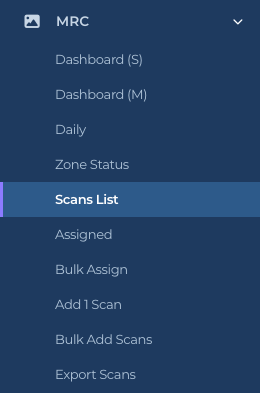
Everything for MRC Task List (Management Rounds Check) sits under MRC in the left sidebar. Click the MRC row to expand or collapse it. The list of pages changes with your account type, so a worker sees a shorter list than a Director (M2).
The MRC group as a Director (M2) sees it
What each page is for
Dashboard (S): today’s snapshot. Scans per hour, Sat and UnSat per hour, and the headline tiles. On a phone this link opens the phone-sized version of the dashboard.
Dashboard (M): the manager view of today. Everything on the snapshot plus Scans by User, NA tasks, Fast Scans and a per-person table.
Daily: the full Power BI report over any date range, with pages for daily totals, zones, areas, users, fast scans and scan details.
Zone Status: the live board of what has and has not been scanned today, zone by zone.
Scans List: every scannable room with its tasks, assignment and last check. Open a room from here to view or edit it.
Assigned: rooms that have someone assigned, split into checked in the last 24 hours and older than 24 hours.
Bulk Assign: hand many rooms to one person at once.
Add 1 Scan: add one new room. This opens the Facility Add a Location page with MRC already switched on.
Bulk Add Scans: upload a spreadsheet of rooms and tasks. Also a Facility page, opened with the MRC sheet selected.
Export Scans: print sheets of MRC QR codes.
Who sees what
Each account type sees the pages it can use:
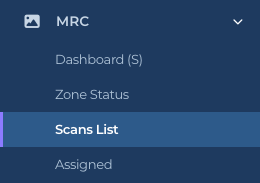
IC account (worker): Dashboard (S), Zone Status, Scans List, Assigned. Lists are read-only.
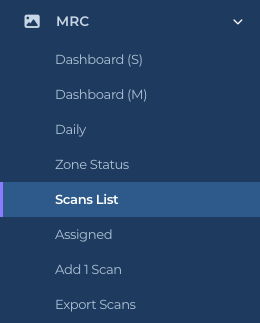
M1 account: everything a worker sees, plus Dashboard (M), Daily, Add 1 Scan and Export Scans. An M1 account can edit rooms and tasks.
Director (M2): everything, plus Bulk Assign and Bulk Add Scans. Only a Director can disable or re-enable a room.
The shorter list an IC account seesThe M1 account list
Getting around
The breadcrumb at the top of every page (Home / MRC / Scans List) takes you back a level.
Every page has a Help button in the top right. It opens a short explanation of that page, written for the version you are using.
On a phone, the sidebar collapses behind a menu button. The MRC pages are the same, laid out in one column.
Pages that open a room (View, Edit) remember where you came from. Back to list returns you to the list you started on, and Back to the label returns you to the room’s uCode record if you came from Facility.
Tips
Bookmark Zone Status if you run the floor. It is the one page that tells you what still needs a check today.
The Facility group (Loc. & Emp. List, Zone List, Export Codes) is where rooms and their uCodes are managed for all products at once. MRC’s own list pages show the MRC side of the same rooms.